
Can You Mount a TV on a Plaster Wall?
Yes, a TV can be mounted on a plaster wall, but only if the weight is fixed into the structural studs behind the plaster. The plaster itself should not be treated as the main support for a television.
Think of plaster as the finished surface rather than the load bearing structure. It may look solid, but it can crack, crumble, or pull away from the wall if too much weight is placed on it. A secure installation depends on finding the timber studs and using suitable hardware that reaches deep enough into the structure behind the wall.
Why Plaster Walls Need Extra Care
Older plaster walls are often dense, brittle, and less predictable than modern plasterboard. Many were built using plaster and lath, where wet plaster was applied over narrow timber strips fixed to studs. Over time, the plaster can become more fragile, especially if the wall has existing cracks, moisture issues, or sections where the plaster has separated from the lath.
If you drill too aggressively or use the wrong fixing, the plaster can crack around the hole. Standard hardware supplied with some TV mounts may also be too short for older plaster walls because it needs to pass through the plaster and lath before reaching the timber stud.
When It Is Safe to Mount a TV on Plaster
It is usually safe to mount a TV on a plaster wall when:
-
You can clearly locate the timber studs.
-
The wall is dry, firm, and in good condition.
-
The plaster is not crumbling or separating from the lath.
-
The mount is rated for the size and weight of the TV.
-
The fixings reach deep enough into the timber studs.
-
The bracket is installed level and tightened correctly.
A stud mounted bracket can be very secure when installed properly. The key is making sure the TV is supported by the wall structure, not just by the plaster surface.
When You Should Avoid Mounting Directly to Plaster
Do not mount a TV directly to plaster if the wall feels soft, spongy, damp, cracked, or unstable. Large cracks, loose plaster, or areas that sound hollow may indicate that the plaster has separated from the lath.
You should also pause if you cannot confidently locate studs, if the wall contains metal lath, or if the mounting position does not line up with suitable structural support. Avoid relying on hollow wall anchors alone for a large or heavy TV on old plaster. In many cases, the safest option is to choose a different wall, use a backer board fixed to studs, or get professional installation advice.
Plaster and Lath vs Plasterboard: What Is the Difference?
Before drilling, it helps to understand what type of wall you have. Plaster and lath walls are common in older homes, while plasterboard is more common in newer builds and renovations.
Plaster and lath walls are usually thicker, harder, and more difficult to scan with a basic stud finder. Plasterboard is typically more uniform, easier to cut, and easier to work with when locating studs.
How Plaster and Lath Walls Are Built
Traditional plaster and lath walls were built by fixing narrow timber strips horizontally across vertical studs. Wet plaster was then applied over the timber strips. Some of the plaster pushed through the gaps between the strips and hardened behind them, helping lock the wall surface in place.
This construction can create a strong wall, but it also creates challenges. The wall may be thicker than modern plasterboard, and the old nails or timber strips can confuse basic stud finders.
Why Plasterboard Is Usually Easier to Mount Into
Plasterboard, often called Gyprock in Australia, is made from gypsum board with a paper facing. It is usually thinner and more consistent than old plaster and lath. This makes it easier to locate studs and drill clean pilot holes.
However, even with plasterboard, a TV should still be fixed into studs or a suitable structural support. The surface material alone is not enough for most TV wall mounting jobs.
How to Check What Type of Wall You Have
A simple knock test can give you a clue. Plaster often feels harder and denser, while plasterboard usually sounds more hollow. You can also remove a power point cover after turning off the power and check the edge of the wall material. If you see rough greyish plaster and timber strips, it may be plaster and lath. If you see a clean white gypsum core, it is likely plasterboard.
If you are unsure, do not guess. A qualified installer can identify the wall type and confirm whether it is suitable for mounting.
Safety Checks Before Mounting a TV on Plaster
Before drilling into any wall, complete a few basic safety checks. This is especially important with older homes, where the wall structure, wiring, and previous repairs may not be obvious.
Check the TV Weight and Mount Rating
Check the weight of your TV and compare it with the load rating of the mount. The mount should be rated above the TV weight, and the hardware should suit the wall type.
Remember that full motion mounts place more leverage on the wall than fixed mounts. When a TV is pulled away from the wall, the force on the fixings increases. This makes strong stud fixing even more important.
Choose the Right TV Wall Mount
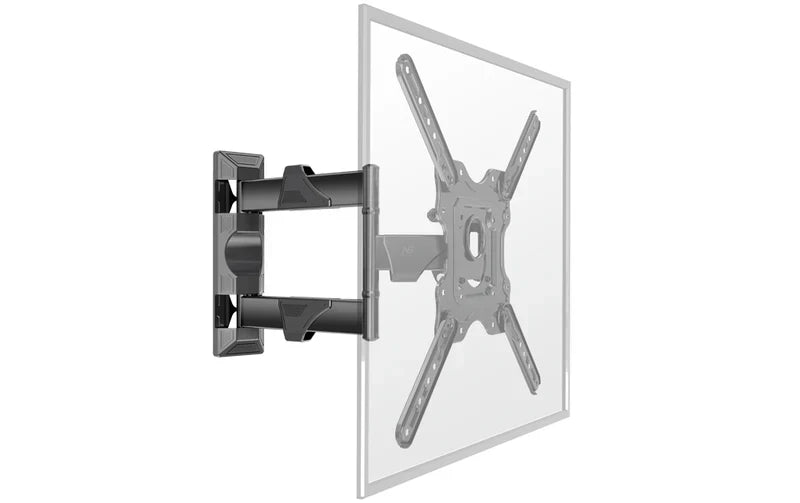
For plaster walls, a mount with a wider wall plate is often easier to install securely because it gives you more chance of reaching two studs. Fixed and tilt mounts are usually lower risk because they keep the TV closer to the wall. Full motion mounts can work, but only when fixed securely into solid studs.
If the mounting position is difficult, compare different TV wall mounts before choosing a bracket.
Check for Electrical Wiring and Plumbing
Use a suitable detector to check for electrical wiring and plumbing before drilling. Older homes can have unusual service routes, and cables may not always run where you expect them to.
Do not cut or chase into the wall unless you know what is behind it. If you need a power point moved behind the TV, use a licensed electrician.
Confirm the Wall Can Support the Load
The studs carry the main load, but the wall surface still needs to be stable. If the plaster is crumbling, damp, loose, or badly cracked, drilling can make the damage worse.
If the wall condition is poor, repair the wall first or choose another mounting location.
Tools and Hardware You May Need
Mounting into plaster requires more care than mounting into standard plasterboard. The right tools help reduce the risk of cracking and improve the chance of a secure fit.
You may need:
-
A deep scanning stud finder.
-
A level.
-
A pencil or marking tool.
-
A drill.
-
Masonry drill bits.
-
Timber drill bits.
-
Suitable coach screws or heavy duty fixings.
-
A socket wrench.
-
A cable management option.
-
A second person to help lift the TV.
Using a Deep Scanning Stud Finder
A basic magnetic stud finder may react to the many small nails used in old lath, which can create false readings. A deep scanning stud finder can be more useful because it is designed to detect through thicker wall surfaces.
Even then, confirm the stud location before drilling large holes. Use small test holes carefully and check that the drill meets consistent timber resistance.
Choosing the Right Drill Bits
Start with a masonry bit to pass through the hard plaster layer. Once you reach timber, switch to a timber bit to drill the pilot hole into the stud.
Using the right bit matters. Forcing a timber bit through hard plaster can damage the bit and increase the chance of wall cracking.
Screws, Anchors, and Fixings for Plaster Walls
The fixings supplied with a TV bracket may not always suit an older plaster wall. In many plaster and lath walls, the fixing must pass through the plaster and lath before reaching the stud. If the screw is too short, it will not have enough grip in the timber.
Use suitable coach screws or heavy duty fixings that are long enough to achieve strong engagement in the stud. Always follow the mount manufacturer’s instructions and seek professional advice if the supplied hardware does not suit your wall.
Step 1: Find the Studs Behind the Plaster
Finding the studs is the most important part of the job. If the TV is not fixed into structural timber, the installation may fail.
Why Studs Are Essential for TV Mounting
The studs are the structural frame behind the wall. They are designed to carry load in a way that plaster alone cannot.
A TV mount creates force on the wall, especially if it tilts, swivels, or extends. Fixing the bracket into studs gives the mount a much stronger and safer foundation.
How to Find Timber Studs Behind Thick Plaster
Start with a deep scanning stud finder. Move slowly and mark the likely edges of each stud, then identify the centre point. You can also look for clues such as skirting board nail lines, power point locations, or subtle vertical patterns in the wall surface.
Use caution with these clues because they are not a substitute for confirmation. Older homes may have irregular framing or previous repairs.
What to Do If Stud Spacing Is Irregular
Older Australian homes do not always have consistent stud spacing. If the studs do not line up with the mount, do not simply move the screws into unsupported plaster.
A common solution is to fix a plywood backer board into two or more studs and then attach the TV bracket to the board. This spreads the load and gives you more flexibility with bracket placement.
Step 2: Mark and Pre Drill the Wall
Once you have confirmed the stud locations, mark the bracket position carefully. Accuracy matters because repeated drilling can weaken the area and damage the plaster.
Why Pilot Holes Help Prevent Cracking
Never drive a screw straight into old plaster without a pilot hole. A pilot hole removes material cleanly and reduces outward pressure on the brittle plaster.
The pilot hole should be sized correctly for the fixing. If it is too small, the plaster may crack. If it is too large, the fixing may not grip properly.
How to Mark the Bracket Position Accurately
Hold the bracket against the wall and mark the holes that align with the studs. Use a second person to help hold the bracket steady. Check the TV height, viewing position, and nearby furniture before drilling.
Mark once, check twice, then drill.
How to Keep the Mount Level Before Drilling
Use a level across the bracket before making final marks. Older homes may have uneven floors or walls, so do not rely on nearby trim or ceiling lines as your guide.
Drill the first pilot hole, loosely attach the bracket, then check the level again before drilling the remaining holes.
Step 3: Secure the Bracket to the Wall
After the pilot holes are ready, attach the bracket using the correct fixings.
Fixing the Bracket into Timber Studs
Drive the coach screws or suitable fixings through the bracket and into the pilot holes. You should feel firm resistance as the fixing bites into the timber. If the screw spins freely or suddenly loses resistance, stop and reassess the hole.
Tightening the Hardware Without Damaging the Plaster
Do not overtighten the fixings. If you tighten too aggressively, the bracket can crush the plaster surface. Tighten until the bracket is firm and does not move, but stop before the plaster starts cracking or crunching.
Checking the Bracket Before Hanging the TV
Before hanging the TV, test the bracket carefully. Apply gentle downward pressure and check for movement, creaking, cracking, or shifting. If the bracket does not feel solid, do not hang the TV.
Step 4: Manage Cables Safely After Installation
Cable management is easier to plan before the TV goes on the wall. With plaster and lath, external cable management is often safer and cleaner than cutting into the wall.
External Cable Management Options
Cable covers or surface mounted trunking can hide wires without damaging the plaster. Many options can be painted to match the wall, giving a neat finish without cutting large openings.
Why Internal Cable Routing Needs Extra Care
Running cables inside a plaster and lath wall can be difficult because the horizontal lath strips block the wall cavity. Cutting channels through the wall can weaken the surface and create a messy repair job.
Internal cable routing should be approached carefully, especially in older homes where wiring may be fragile or difficult to inspect.
When to Call a Licensed Electrician
If you need a new power point behind the TV, call a licensed electrician. Do not run power cables inside the wall yourself. Electrical work must be completed safely and legally.
What If You Cannot Find a Stud?
If you cannot find a stud where you want the TV, do not rely on hope or a weak fixing. Step back and consider safer alternatives.
Can You Use Toggle Bolts on a Plaster Wall?
Toggle bolts may be suitable for some light duty applications, but they are not the best choice for large or heavy TVs on old plaster. The wall condition, TV weight, and bracket type all affect safety.
If you are considering toggle bolts, check the fixing manufacturer’s load rating and remember that ratings may not apply to old, brittle, or damaged plaster.
When a Plywood Backer Board May Help
A plywood backer board can help when the studs are too far apart or do not line up with the TV bracket. The board should be securely fixed into the studs, then the TV bracket can be attached to the board.
This method can spread the load and create a stronger mounting surface. For a cleaner finish, paint the board to match the wall before installing the bracket.
When to Choose a Different Wall or Mounting Position
Choose another location if the wall is damp, crumbling, badly cracked, or unsuitable for structural fixing. You may also consider a freestanding TV stand, floor stand, or ceiling mounted solution depending on the room layout.
Protecting the TV and the wall is more important than forcing a mount into the wrong position.
Step 5: Hang the TV and Complete the Safety Check
Once the bracket is secure, lift the TV into place with another person. Do not attempt to lift a large TV on your own.
Lifting and Positioning the TV Safely
Check the mount instructions before lifting the TV. Make sure the mounting arms are correctly attached to the back of the screen and that all screws are tightened to the manufacturer’s specifications.
Lift carefully and guide the TV onto the bracket without twisting or forcing it.
Securing the Safety Locks
Most TV mounts include locking screws, clips, or safety mechanisms that prevent the TV from lifting off the bracket. Do not skip this step. Secure the locks before letting go of the screen.
Testing the Mount Before Regular Use
After the TV is installed, gently check for movement. If it is a tilt or full motion mount, move it slowly and watch the wall surface. Stop immediately if you see cracking, flexing, or any sign that the bracket is pulling away.
How to Protect the Wall After Installation
A plaster wall can remain stable for years when the mount is installed correctly, but it still pays to check the area from time to time.
Avoid Pulling or Overextending the TV Mount
Be gentle with full motion mounts. Pulling the TV out too quickly increases the force on the wall. Move the TV slowly and avoid yanking it into position.
Check the Fixings Over Time
Check the mount periodically to make sure nothing has loosened. If the bracket begins to move or the TV no longer feels stable, stop using the mount until it has been inspected.
Watch for Cracks, Movement, or Wall Damage
Look for cracks around the bracket, plaster movement, or changes in the wall surface. These can be signs that the wall is under too much stress or that the fixings need attention.
Choosing the Right TV Mount for a Plaster Wall
The right mount depends on the wall condition, TV size, stud spacing, and how much movement you need.
Fixed TV Mounts
Fixed TV mounts are often the safest option for plaster walls because they keep the TV close to the wall. This reduces leverage on the fixings and creates a clean, low profile look.
Tilt TV Mounts
Tilt mounts are a practical middle option. They allow you to angle the screen slightly to reduce glare while keeping the TV close to the wall.
Full Motion TV Mounts
Full motion mounts offer the most flexibility, but they place more stress on the wall when extended. Only use a full motion mount on plaster when you are confident it is fixed securely into strong timber studs.
Final Thoughts: Can a TV Be Mounted on a Plaster Wall?
A TV can be mounted on a plaster wall, but the installation needs more care than a standard plasterboard wall. The most important steps are finding the studs, checking the wall condition, using suitable fixings, and choosing a mount that suits the TV weight and room layout.
If the wall is damaged, the studs are hard to locate, or the TV is large and heavy, it is safer to get professional advice before drilling. For suitable mounting options, explore the TV wall mounts available from Screen Mounts and choose a bracket that matches your screen size, weight, and installation needs.
Share:
Single or Dual Monitor Arm: Which Setup Wins for Your Desk?
Revolutionizing Classroom Mobility: ScreenMounts and NB Ergonomic to Showcase the New P150 Stand at EDUtech 2026