
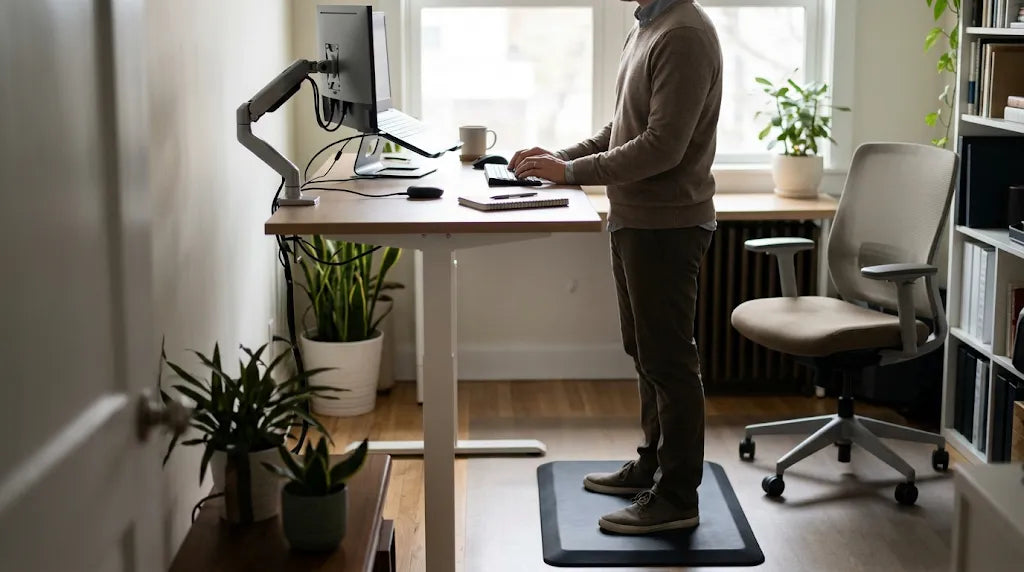
Stand a moment and look at where your arms are. If your shoulders are creeping up towards your ears, the desk is too high. If your hands are reaching down and your back is rounding forward, it is too low. Standing desk height is not a number you memorise; it is a setting you find with a simple test, and the number that comes out of it is different for almost everyone.
The short answer
For an average-height adult, a standing desk usually lands somewhere between 100 and 110 cm. That is a starting point, not a rule. What actually decides the height is your elbow: when your hands are on the keyboard, your forearms should be level with the floor and your elbows bent at roughly 90 degrees, with your shoulders relaxed. Set the desk to whatever height puts your elbows there. If that turns out to be 96 cm or 118 cm, that is your standing desk height.
The 90-degree elbow test, in three steps
-
Stand in front of the desk with your arms hanging relaxed by your sides. Do not reach for the keyboard yet.
-
Raise or lower the desk until the surface sits level with, or just below, the bottom of your elbow.
-
Now rest your hands on the keyboard and check your shoulders. They should be down and relaxed, not lifted. If they are lifted, the desk is still too high.
Run the test twice, once at the start of the day and once after you have been working for an hour. Small changes in footwear or posture show up quickly, and the second check is the one people skip.
Standing desk height by body height
These are typical starting points. Treat them as somewhere to begin, then adjust until the elbow test passes.
-
Under 160 cm: around 95 to 102 cm
-
160 to 170 cm: around 100 to 107 cm
-
170 to 180 cm: around 105 to 112 cm
-
180 to 190 cm: around 110 to 118 cm
-
Over 190 cm: around 118 to 125 cm
Two things move these numbers. Shoes add roughly 1 to 3 cm, and an anti-fatigue mat adds another 2 to 3 cm. Both are worth measuring rather than guessing, because a mat you stand on all day effectively raises the floor.
Why your sitting height and standing height are different numbers
Your seated desk height is set by your elbow when you are sitting, and that is usually somewhere near 72 cm. Your standing height is set by your elbow when you are standing, which is much higher because your legs are now doing the work. A desk that is comfortable to sit at will be far too low to stand at, and a desk set for standing will be unusable when you sit back down. That is the whole reason adjustable sit stand desks exist: the desk has to change when you do.
What else has to move when the desk goes up
Raising the desk changes the height of everything on it, so three other things need attention.
-
The monitor. The top of the screen should sit at, or slightly below, eye level, and the screen should be about an arm's length away. If the monitor stays on its own base it will usually be too low once you stand, which pushes your chin up and your neck forward.
-
The keyboard and mouse. Both belong on the desk surface at elbow height. A fixed keyboard tray cannot follow the desk up, so standing at a desk with an under-desk tray usually means reaching down all day.
-
The keyboard angle. Keep the keyboard flat or slightly tilted back. A keyboard propped up at the back forces your wrists to bend upwards, which is the position most likely to cause discomfort over a long session.
Common mistakes
-
Setting the height by how it looks. A desk that looks right from across the room can still be 5 cm too high for the person using it.
-
Standing all day on the first day. Build up gradually. Start with one or two standing blocks of 20 to 30 minutes, then extend them as your legs get used to it. Alternating between sitting and standing is the point of the desk, not standing permanently.
-
Locking your knees or leaning on the desk. Both shift the load off your muscles and onto your joints. Keep your weight even on both feet and your knees soft.
-
Leaving the monitor at sitting height. The desk moves; the screen has to move with it.
-
Ignoring the mat. Hard floors and long standing blocks are a poor combination. A mat makes a real difference to how long you can comfortably stand.
If your desk will not go high enough
Some fixed desks top out well below 100 cm, and some adjustable desks stop short of what a taller person needs. There are three practical fixes.
-
Raise what you work on. A desk riser or standing desk converter sits on the existing desk and lifts the keyboard and monitor together to standing height. This is the usual answer where the desk cannot be replaced.
-
Move the monitor separately. A monitor arm lets you set screen height independently of the desk, which is useful when the desk height is fixed by someone else in the room.
-
Choose a desk with a wider range. If you are buying, check the height range rather than the headline number. A desk that covers roughly 70 to 120 cm will suit a much wider group of people, including everyone who shares the workspace.
Quick checklist
-
Stand with your arms relaxed, then set the desk level with your elbows.
-
Hands on the keyboard, elbows at 90 degrees, shoulders down.
-
Feet flat, knees soft, weight even.
-
Top of the screen at or just below eye level, an arm's length away.
-
Account for shoes and an anti-fatigue mat.
-
Build up your standing time over the first couple of weeks.
Bottom line
The right standing desk height is the one that puts your elbows at 90 degrees and your screen at eye level, with your shoulders relaxed. For most adults that lands between 100 and 110 cm, but the test matters far more than the number. Set it, check it again after an hour, and adjust until it disappears from your attention.
Share:
How to Mount Projector to Ceiling: Simple Installation Guide
Standard Desk Height: What Height Should Your Desk Be?